Getting started
Synopsis
ax [pick]                     open the picker
ax new [harness [flags...]]   start a new session
ax "task" [flags]             run a task on your default harness
ax <harness> "task" [flags]   run a task on a named harness
ax read | send | tag | ask | reply | runs | kill | list
ax help
ax "task" is the short form once you set
default_harness (see
Configuration file). A known
verb or harness name shadows a bare prompt, so
ax <harness> "task" still targets a specific
harness. Both forms appear below.
Description
AgentSwitch is a daemonless switchboard for CLI coding agents.
It ships as a single Go binary called ax that
launches, watches, detaches, reattaches, and coordinates agent
sessions from one TUI. Each coding agent (a harness) already
writes its own transcripts. ax reads those stores, lists every
session in one searchable terminal picker, and resumes the one
you pick by running that harness's own resume command.
ax does not replace your harness, and it has no LLM of its own. There is no daemon either: everything works off local files, databases, and the heartbeat files live sessions write. No mux is the default. ax's own session holder keeps your harnesses alive when you detach (Ctrl-a then d), and the picker lets you check on them across projects and reattach. The launch, detach, monitor, reattach loop works with no tmux or zellij installed.
A multiplexer is optional. When you run tmux or zellij, ax drives it natively, opening and managing panes and windows for your sessions. If a session is already open, ax jumps to its window instead of starting a second copy. Sessions on other machines fold into the same list over SSH (see Remote hosts).
ax also has a set of shell verbs, so one session can drive others: launch sessions, read their turns, steer them, gate their completion on an accept check, and stop them. Hard limits on cost, fan-out, and time bound every run (see Control plane). Run the verbs yourself, or give a session a short behavior prompt that names the commands, and it can coordinate the run.
ax builds on tools native to your system (tmux, ConPTY,
SSH, local files) rather than a runtime of its own, so every
backend piece is swappable. Extending it takes one
[[harness]] block. One picker and one verb set cover local
LLMs, frontier-model harnesses, and remote sessions.
For step-by-step walkthroughs with real captured terminal output, see the tutorials page.
Installation
Install methods
| Method | Platform | Command or Location | Notes |
|---|---|---|---|
| Homebrew cask | macOS | brew install --cask agentswitch-org/ax/ax |
Installs from the agentswitch-org/homebrew-ax tap. Recommended on macOS. |
| Debian / Ubuntu package | Linux (deb) | Linux install commands |
The quickstart has a pasteable command that resolves
the latest .deb asset for
amd64 or arm64 and installs
it with apt.
|
| RPM package | Linux (rpm) | Linux install commands |
The quickstart has a pasteable command that resolves
the latest .rpm asset for
amd64 or arm64 and installs
it with dnf.
|
| Binary release | macOS, Linux, Windows | latest release |
Download the archive for your platform and
architecture (.tar.gz on macOS/Linux,
.zip on Windows), extract ax
or ax.exe, and place the executable on
your PATH.
|
| Go toolchain | macOS, Linux, Windows | go install github.com/agentswitch-org/ax@latest |
Builds ax locally from the module source.
Requires Go 1.26.4+. The executable lands in
$(go env GOPATH)/bin or
$(go env GOBIN). That directory must be on
your PATH.
|
| Source checkout | macOS, Linux | make install |
Clone the repository
and run make install. It builds and copies
ax to ~/.local/bin.
|
Runtime requirements
Fuzzy matching is built in, so you don't need fzf.
Everything below is optional. ax keeps working when these
tools are missing. If you already use one, ax can use it.
| Program | Requirement | Use |
|---|---|---|
tmux |
optional | Optional multiplexer backend on macOS and Linux. When present, ax drives it natively: each session runs as a window and ax opens and manages them for you. The bundled tmux/ax.tmux adds bindings that open the picker in a tmux popup. Without it, ax's own session holder keeps every session alive and tracked, so the full launch, detach, monitor, reattach loop works with no mux at all. Zellij is the alternative (see Multiplexer backends). |
dtach |
optional fallback | Legacy hold backend for hosts that explicitly set hold_backend = "dtach". The default native holder is built into ax and needs no external binary. |
ripgrep |
optional | Speeds up transcript content search. / in the picker and ax search work the same either way. Without it, AgentSwitch searches in-process. |
zoxide |
optional | Supplies directory candidates when starting a new session. Without it, type a path (/ or ~ to browse). |
For a remote host, ax must be installed on that
host too. Install dtach there only if that host
explicitly uses the dtach hold backend.
Multiplexer backends
By default ax runs on its own session holder with no multiplexer. Sessions launch, stay alive when you detach (Ctrl-a then d), show up in the picker, and reattach on demand. Set a multiplexer and ax drives it natively, so live sessions run as real windows or tabs you can jump into. One config setting picks the backend.
| Backend | A session runs as | Behavior |
|---|---|---|
no mux / process |
a detached process ax holds | The zero-dependency path and the native Windows
default. ax starts each session under its own holder so
it survives the launching terminal and keeps running
when you detach with Ctrl-a then d. On Windows the
holder runs the harness under ConPTY and drives
ax send / interrupts over a per-session
named pipe; on Unix the process backend uses the native
holder and process signals. You watch status and
transcript preview in the picker, and reattach anytime
with Enter or ax attach. There
is no mux window to move or show in the WIN column. |
tmux |
a tmux window | Optional on Unix. When set, ax drives tmux natively:
sessions open in the
background or focused, ax finds a session's window again
by a tag it set at launch, multi-line ax send
arrives as one bracketed paste, and ax move
sorts related windows into a named tmux session. |
zellij |
a Zellij tab | The optional alternative. Each session gets its own
named tab holding one pane. Launch, jump, send, and
interrupt all work. Zellij's CLI is weaker at queries
than tmux, so a few things are best-effort: a new tab
always opens focused because Zellij has no
open-in-background, ax only sees the Zellij session you
are attached to, a multi-line send submits at each
newline, and ax move is not supported. |
none |
the current terminal | Bare pass-through with no window tracking and no holder. ax launches the session in the terminal you are in and leaves it there. |
Pick a backend with the mux setting in your
config file:
# ~/.config/ax/config.toml
mux = "tmux"     # optional. unset uses the built-in no-mux holder. tmux, zellij, process, or none
An unset or unrecognized value means the built-in no-mux
holder (the same behavior as process), so ax
works with no config at all and no multiplexer installed. Set
mux to tmux or zellij to have ax drive that
multiplexer instead. Under none ax launches the
session in the current terminal and does not track it.
The tmux and zellij backends prefix every window, session,
and tab name they create with ax:, so
ax-managed windows stand out in the native status bar and
a single prefix match selects all of them. Set
mux_prefix to use a different prefix, or
mux_prefix = "off" to disable it. The process
and none backends have nothing to name, so the prefix does
not apply to them.
The picker
Layout
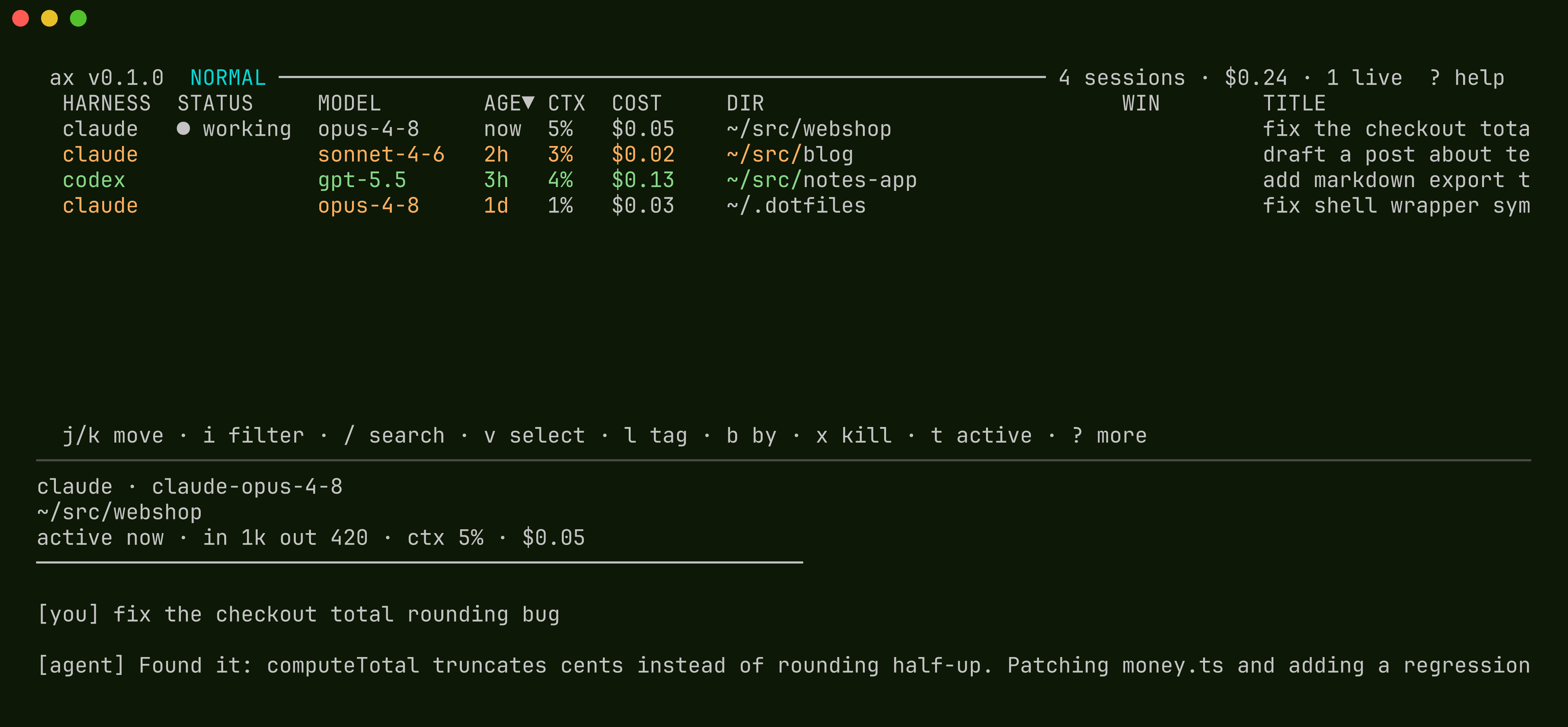
Each harness tells ax where its transcripts live, how to pull a session id out of them, which parser to use, and how to launch or resume a session. ax scans those stores and builds one table: status, model, age, context use, cost, directory, window, and title for every session, local or remote.
Sessions ax launches write heartbeat files while they run. From those files, tmux window metadata, and a harness state hook if you install one, the picker knows whether a session is working, idle, blocked on you, done and waiting for review, or dead after a bad exit.
Example screen
The picker is a terminal table with a transcript preview pane below it. The example uses the default columns and sample data.
Status values
The STATUS column folds attention, activity, and
liveness into one cell. When several apply, the most pressing
wins: attention first, then activity, then a crash. Blank
means the session is not running.
| Status | Meaning |
|---|---|
✓ review |
A run finished and is presenting its result. It waits for you to accept (green). |
needs you |
Blocked on your input: a permission prompt or an ax ask question (red). |
needs auth |
Blocked on a login or OAuth flow. Attach to complete it (yellow). |
working |
Live with recent terminal output. Shown with a spinner. |
idle |
Live but quiet. |
crash |
The heartbeat went stale. The session died without a clean exit. |
| blank | Inactive. A past session you can resume. |
Columns
| Field | Description |
|---|---|
HARNESS |
The command-line agent or harness that owns the transcript. |
STATUS |
The merged status cell described above. |
MODEL |
Model recovered from transcript metadata. |
AGE |
Time since the last recorded session activity. |
CTX |
Estimated context-window use, from harness token counts and model context size. Colored as it approaches compaction. |
COST |
Recorded harness cost when available. Otherwise an estimate from token counts and model pricing. |
DIR |
Project directory of the session. A leading ! marks a folder that was renamed or moved. Resuming prompts you to relink it. |
WIN |
Live tmux location when the session is already open. Blank means no matching window. |
TITLE |
Session title or inferred summary, depending on the harness transcript format. |
A few columns show up on their own: HOST when you
have remote hosts, NAME and GROUP
when there are runs, and TAGS once
anything is tagged. Put tag:<key> in the
columns config to pin one tag key as its own
column.
Keys
The picker opens in normal mode. You can rebind any key below
under [keys] in the config. The help screen
(?) and the hint row always show the keys you
have set. Enter (open), Esc
(leave a mode), and the arrow keys are fixed.
| Group | Keys | Action |
|---|---|---|
| movement | j / k |
Line down / up. |
g / G |
Jump to top / bottom. | |
d / u |
Half page down / up. | |
| preview | J / K |
Scroll the transcript preview. |
n / N |
Next / previous content-search match. | |
| sorting | H, L, s |
Select a column and sort by it. Press s again to reverse. |
z |
Snap the selected column to its full content width so a truncated directory, title, or tag pile reads whole. Press z again to snap it back. |
|
| view | t |
Toggle all sessions vs active only. Saved between opens. |
m |
Filter by machine, cycling all, local, each host. | |
f |
Filter by run. | |
T |
Toggle the run tree view. | |
b |
Cycle the group-by pivot: flat, by directory, by run, then one per tag key. | |
| search | i, a |
Filter the rows on metadata. Esc returns to normal mode, Enter keeps the filter. |
/ |
Search transcript text. Matches highlight in the preview. | |
| session | Enter |
Open: resume the session, or jump to its window if already open. |
e / E |
Resume without / with the harness's configured flags. | |
c / C |
New session without / with the harness's configured flags (Ctrl-N also works while filtering). |
|
x |
Kill the session. | |
r |
Reply to a session waiting on an ax ask question. |
|
Tab |
Mark / unmark a row for a multi-session action. | |
v |
Visual select: j/k extends, v or Enter keeps the marks, Esc drops them. |
|
l, M |
l tags the selection (key=value sets, -key removes). M moves its windows into a tmux session you name. |
|
| exit | ? |
Show the in-terminal key reference. |
q |
Quit the picker. |
Commands
| Command | Description |
|---|---|
ax, ax pick |
Open the picker. |
ax new [harness [flags...]] |
Start a new session interactively. With a harness argument it skips the picker, e.g. ax new claude --dangerously-skip-permissions. |
ax list [--run R] [--json] |
Print indexed sessions. --json emits the federation format other hosts and coordinators read. |
ax attach <id> [--yolo] |
Reattach a held session in the current window. Closing the window detaches it again. Inside a session: Ctrl-a then d detaches, Ctrl-a then a reopens the picker, Ctrl-a then y (or --yolo) stops the harness and resumes the same session with its permission-bypass flag added. |
ax search <query> |
Print ids of sessions whose transcript matches (--json available). |
ax kill <id>... | --run R |
Stop sessions. --run cascade-kills a whole run. |
ax archive, ax unarchive |
Hide or restore old rows from the default picker and list views without deleting transcripts or metadata. |
ax prune [--reap-workers] |
Archive safe local lifecycle clutter. --reap-workers also closes/kills already-concluded resident workers that pass the same reap gates as delayed cleanup. |
ax move --tag k=v | --run R | <id>... [--to NAME] |
Move sessions' windows into their own tmux session. |
ax log |
Print the diagnostic log (session launches, errors). |
ax models update |
Refresh model price and context data from models.dev. |
ax version |
Print this ax build's version, including the stamped commit and build date when release or deployment ldflags provided them. |
ax help |
Print command usage, including the control-plane verbs. |
Control plane
Model
A session is a job. One session can drive others: launch them, read what they produce, steer them, decide when they are done, and stop them once a check passes, with little or no human in the loop. ax itself is only the mechanism. It has no LLM and never judges whether a task is finished. It reports facts (a turn finished, a session is waiting, a session exited or crashed), performs actions (launch, read, send, tag, ask, kill), and enforces limits. The judgment happens in a session.
There is no daemon. The verbs are stateless CLI commands that read and write sidecar files. The only long-running piece is the coordinator, and that is itself a session ax manages.
The launcher
A task launch (ax "task", or
ax <harness> "task" for a specific harness)
launches without a prompt and prints the session id and run id,
so a script or a coordinator can grab them:
$ ax "fix the flaky test"
a1b2c3d4  a1b2

$ ax "add a CHANGELOG entry" --wait --unattended
$ echo $?
0

$ ax "build a blog" --behavior ~/.config/ax/coordinator.md \
    --write './.coordinator/**/*.md' --no-subagents --max-depth 2 \
    --label role=coordinator --max-cost 100 --accept ./verify.sh
By default a task runs watched: the harness runs interactively
in a tracked window and the session concludes into a
done state when the task finishes, so you can watch
it, ax send to it, and read its final report after.
It skips the folder-trust prompt, so a session started in a
fresh directory (a worktree, a /tmp dir) never
hangs waiting on it. --close-on-done ends the
window when the task finishes instead of holding it in
done. --headless is the explicit
opt-in to a screenless job that runs the harness
non-interactively (for Claude Code, claude -p)
and exits on done.
--wait blocks and hands back an exit code: 0 when
the session tagged success (and --accept passed),
non-zero on a fence trip, a give-up, or a crash. Idle never
counts as done. A waited task still runs watched under the
holder unless you also pass --headless, so it
remains attachable while the caller waits.
--unattended makes
ax ask return a default instead of blocking, so a
CI run can't deadlock waiting on a human. The one-line CI
shape:
ax "make 'go vet ./...' pass" --wait --unattended --accept "go vet ./..." --timeout 30m
Verbs
Every verb is non-interactive: ids and data on stdout,
diagnostics on stderr, and exit codes that reflect the
outcome. Any verb
that takes an id also takes a host/id, and routes
over that host's transport.
| Verb | Purpose |
|---|---|
ax <harness> "TASK" |
Launch a task. Mints and prints the session id and run. |
ax read <id> | --run R |
Read a session's turns from the parsed transcript, never a scraped screen. --follow blocks and streams one NDJSON event per turn boundary. --run multiplexes a whole run into one stream; add --active --from-now --exclude ID to watch only live workers from this point forward and skip the coordinator's own progress turns. |
ax send <id> "text" |
Type input into a running session. --interrupt redirects a session mid-turn without killing it. --no-enter skips the submit. |
ax tag <id> |
Set metadata: --name, --run, --parent, --add-label/--rm-label, and --outcome, which concludes and applies the accept check to a run. |
ax ask "question" |
Human ask / reply, called by a session: blocks until answered, and the picker shows needs you. |
ax reply <id> "answer" |
Answer a blocked ax ask (or use the picker's r). The reply is free-form text, so it can be the next instruction. |
ax wait <id>... [--all|--any] |
Block until sessions reach a terminal state. The id list can mix local ids and host-qualified ids such as win01/<id>. Exit 0 when they conclude success, non-zero on failure, 124 on --timeout. The scripting counterpart to --wait on a launch. |
ax result <id> [--json] |
Print a concluded session's final report (its last assistant message) plus outcome and exit, the watched equivalent of the final answer from a headless claude -p. |
ax continue <id> "TASK" |
Resume a session's context with a new task, tracked and scriptable. The reuse primitive between ax send (needs a live window) and a cold launch. Watched by default, and --wait runs it as a job. Works for claude, pi, and codex. |
ax coordinate "GOAL" |
One-command coordinator bootstrap: launches the bundled coordinator behavior fenced to .coordinator state, keep-live, self-propelled, and attached. See The coordinator. |
ax restart <id> [--fresh] |
Rebuild a session from its persisted launch spec (same task, model, fences, env, and auth), pinned back into its run. --fresh also cleans up its socket and process files. |
ax check |
Run this run's --accept check and print its output and status, without concluding the run. |
ax list --json [--run R] |
The coordinator's live world snapshot: the run tree, per-session state, cost, model, host-qualified ids, and the local node's ax/wire version report. |
ax kill --run R |
Cascade-kill a whole run, root session last, so no session is orphaned. |
ax runs [--follow] [--json] |
List concluded run records with outcomes. |
ax metrics |
Session and run cost, tokens, duration, and outcome counts. --json for scripting, --prom for a Prometheus textfile export. |
ax hook install <harness> |
Make the harness report its state authoritatively through its own hooks instead of ax inferring it from output. |
read --follow emits turn,
waiting (reason input or
auth), exit, and crash
events, one JSON object per line, each carrying a cursor and a
short preview.
ax read --run "$AX_RUN" --follow --active --from-now --exclude "$AX_SESSION_ID"
That is the usual long-running coordinator stream: active
workers only, no old turn replay, and no wakeups caused by the
coordinator's own transcript. Use --exclude-self
when AX_SESSION_ID is reliable in the caller's
environment.
Fences, accept check, ask / reply
Fences are hard limits ax enforces, similar to resource limits for a pod. Depth and session fences are checked at launch. Cost, token, and time fences are polled by the run's root session, which cascade-kills the run and writes the run record the moment one trips.
| Fence | Bounds | Default |
|---|---|---|
--max-cost N |
Total spend across the run, at API pricing. | none |
--max-tokens N |
Total tokens across the run. Use on a subscription, where marginal cost is zero and --max-cost is inert. |
none |
--max-workers N |
Concurrent live sessions in the run (tree width). | none |
--max-depth N |
Recursion depth (tree height). A deeper launch is refused. This prevents runaway recursive launches. | 1 (flat) |
--timeout DUR |
Wall-clock limit for the whole run. | none |
The accept check is --accept ./check.sh. When a session tags
--outcome success, ax runs the script. A non-zero
exit rejects the tag and feeds the output back, so a run
cannot conclude on an unverified claim. For ask / reply
(ax ask / ax reply), the behavior
decides when to ask a human. ax blocks the session, sends the
notification, and holds the question until you answer.
Launch from inside a session and it inherits that session's
run and parent automatically (through
AX_SESSION_ID, AX_RUN,
AX_DEPTH, and the fence limits ax puts in the
environment), so the run tree assembles automatically.
--group and AX_GROUP still work as
deprecated aliases for --run and
AX_RUN. A
[policy] section can also allow-list harnesses and
allow or deny models at launch.
The coordinator
A coordinator is a session launched with the coordinator behavior: it splits the work, launches sessions, judges their results against the evidence, and concludes when the criteria pass. ax imposes no shape on the run: pipeline, fan-out, tournament, and recursion are all decided by the session. The one-command bootstrap:
ax coordinate "Add dark mode to this app. Done when: the toggle works and 'npm test' passes."
The behavior ships inside the binary; on first use it is
written to
~/.config/ax/behaviors/coordinator.md, where
your edits win on every later run.
ax coordinate applies the reference
guardrails (--write './.coordinator/**/*.md'
--no-subagents --fence best-effort --max-workers 2
--max-depth 2 --keep-live --self-propel --attach);
any launch flag you pass overrides them, and
--harness / --small pick the
harness and the small-model behavior variant.
--self-propel is ax's outer loop: when the
session ends a turn with its task unfinished, ax re-invokes
it (pi/codex via their transcript's turn end, claude via
its Stop hook's terminal marker) until the done criteria
pass, it genuinely needs a human, or an idle cap trips.
A hand-rolled launch stays fully supported, e.g. to pin a
model and budget (--behavior takes a behavior
file path; --behavior-text takes inline
text):
ax "Add dark mode to this app. Done when: the toggle works and 'npm test' passes." \
    --behavior ~/.config/ax/behaviors/coordinator.md \
    --write './.coordinator/**/*.md' --no-subagents --max-depth 2 \
    --label role=coordinator --model opus --max-cost 25 --max-workers 3
--write './.coordinator/**/*.md' is the fence.
The coordinator can write only its own
.coordinator/*.md state files and nothing else,
and all mutating shell is denied, so every code change,
config edit, and commit has to go through a worker it
launches. That is what keeps the coordinator from editing
the project directly.
--no-subagents turns off the in-process
Task/Agent tools so every unit of work goes through
ax claude, where it is a tracked session you can
watch, attach to, and kill, with its own fence from its own
launch. It is required because whether the write fence reaches
a Task subagent depends on the Claude Code harness version, and
on a build where it does not, a subagent would get an ungated
shell. It is not a write sandbox: the write boundary is
--write, and a fenced coordinator can still launch
a writable worker by design. --max-depth 2 lets a
worker launch its own workers, one tier deeper than the
default.
Watch the run in the picker: f filters to the
run, T shows the run tree.
 ax v0.1.0  NORMAL ───────────── run:blog-x1  tree ── 4 sessions · $19 · 4 live  ? help

 HARNESS  STATUS      NAME           GROUP    MODEL       AGE  CTX  COST   TITLE
 claude   ⠧ working   coordinator    blog-x1  opus-4-8    now  38%  $9.80  build a blog about racecars
 claude   ⠋ working   ├─ posts       blog-x1  sonnet-4-6  now  22%  $5.14  write the first six posts
 claude   needs you   ├─ theme       blog-x1  sonnet-4-6  1m   17%  $3.02  dark retro theme
 codex    idle        └─ deploy      blog-x1  gpt-5.5     3m   9%   $1.21  wire the pages deploy
Attention rolls up the tree: the root session shows
needs you whenever any session under it is blocked,
so you go straight to the blocked session instead of scanning.
Answer with r.
Done and review
An attended run does not stop silently. When the session's
criteria pass, it tags --outcome success (and runs
the --accept check if you set one), shows a one-line
result through ax ask, and waits. The picker marks
this the green ✓ review state, separate from the
red needs you: the run is presenting its result,
not blocked. Reply to accept it, or reply with new
criteria and it keeps going. Finished runs land in
ax runs with an outcome of success,
gave_up, budget_hit, or
crashed.
Remote hosts
Federation
ax merges sessions from other machines into one list over SSH, or any transport command:
# ~/.config/ax/config.toml
[[host]]
name      = "laptop"
transport = "ssh -t user@laptop"
Each host needs ax installed. Install
dtach only on hosts that explicitly use the dtach
hold backend. No daemon, no open port: ax runs the transport
command, and that command carries its own auth. Pick a remote
session and it attaches over the transport in a local window.
ax kill, ax read,
ax wait, ax result, and the rest
route the same way; ids are host-qualified, e.g.
win01/<id>. m filters the list by
machine and shows each host's status: online, offline,
no ax, or old ax.
Remote compose is intentionally explicit. Choosing a remote
target in the compose chooser aborts as unsupported rather
than silently degrading to a plain launch. For remote task
launches, run ax <harness> "task" --host NAME,
run ax new on that host, or invoke the transport
yourself.
# Native Windows host reached over OpenSSH + PowerShell
[[host]]
name      = "win01"
transport = "ssh -t win01"
shell     = "pwsh"
# headless = true  # use if remote interactive launch/attach is not verified
Use shell = "pwsh" when the remote sshd
DefaultShell is PowerShell, so ax quotes forwarded arguments
with PowerShell rules. ax config status reports
each host's OS class, shell, ax version, wire version, and
profile drift.
Containers work the same way: a transport like
container exec -i <id> or
kubectl exec makes a container or a pod another
host, and throwaway boxes can register themselves into the
picker. Setup details, advice on credentials, and the reasoning
behind sandboxing are in the
GitHub README
and
docs/control-layer.md.
Running agents safely
By default, ax launches each agent in your harness in autonomous or permission-bypass mode so agents work without blocking. That means they run unattended. Run them in an environment you trust. You can control this behavior per harness in the config.
Sandboxing with nono
nono is a zero-setup sandbox for AI agents: no daemon, no container, no VM. A sandboxed agent gets read/write access to its workspace and nothing else. Your SSH keys, your cloud credentials, and the rest of your disk are invisible to it, enforced by the kernel rather than by the harness's own permission prompts. ax integrates it as a launch axis:
ax claude "fix the flaky test" --sandbox
That wraps the harness in
nono run --profile nolabs-ai/claude -- …
using the registry profile matching the harness. To sandbox
every task launch by default, set it once in
~/.config/ax/config.toml:
[sandbox]
backend = "nono"          # wrap every `ax <harness> "TASK"` launch
# profile = "you/custom"  # optional: override the default profile

[[harness]]
name = "claude"
sandbox_profile = "nolabs-ai/claude"   # optional per-harness override
--no-sandbox opts a single launch out. An
explicit --sandbox with no nono on
PATH fails loudly; the config default degrades
to an unsandboxed launch with a warning, so a box without
nono keeps working. The sandbox wraps only the harness
process: attach, detach, ax send, heartbeats,
and holders behave identically. Custom profiles come from
nono profile init mine --extends nolabs-ai/claude;
macOS and Linux are supported natively, Windows via WSL2.
Sandboxing composes with the fences below: the write fence shapes what a compliant agent does, the sandbox bounds what any agent can do, and disposable boxes bound the blast radius when everything else fails.
Disposable boxes
An unattended agent will do whatever it decides the task needs, and it can be steered by anything it reads. So don't run it on your workstation. Give it a dedicated, disposable box, one clone or worktree per task, and tear it down when the task is done. A box that only ever held one job has little to steal and little to break.
Keep trust one-directional. Your machine reaches into the agent box. The box does not reach back. ax fits this shape by design: it pulls over your transport, runs no daemon, and opens no port. Nothing on the box waits for a connection, so the agent has no path back to your machine.
Never forward your SSH agent into an agent box. An injected
prompt that lands on a box with a forwarded agent can
authenticate as you to every host your key reaches, and
ssh -A (or a careless ProxyJump)
grants exactly that. The default ssh -t
transport does not forward the agent.
Secrets and egress
Keep no standing secrets on the box. No personal SSH keys, no cloud credentials, no password manager. Inject short-lived, task-scoped credentials for the one job at hand, so a compromised box leaks a narrow, expiring grant instead of your long-lived credentials.
Default-deny egress. An agent that can reach the whole internet can exfiltrate anything it touches and pull in anything it is told to. Allowlist only what the task needs: the LLM API, the package registries it builds against, and the git remotes it pushes to. Everything else stays blocked.
Configuration and data
Configuration file
Claude Code, Codex, pi, and opencode are built in and work with
no config file at all. To change one of them or add your own
harness, copy
config.example.toml
to ~/.config/ax/config.toml. Overrides happen field
by field: a [[harness]] with just
name and args adds flags but keeps
the built-in glob, resume, and launch. Point
AX_CONFIG at another file to use it instead. When
XDG_CONFIG_HOME is set, the default path is
$XDG_CONFIG_HOME/ax/config.toml.
# ~/.config/ax/config.toml

default_harness = "claude"

columns = ["harness", "status", "model", "age", "ctx", "cost", "dir", "win", "title"]

[[harness]]
name = "myagent"
glob = "~/.myagent/sessions/*/*.jsonl"
id_regex = "_(?P<id>[0-9a-f-]{36})\\.jsonl$"
format = "pi"
resume = "cd {dir} && myagent --resume {id} {args}"
launch = "myagent {args}"
args = "--profile work"

[keys]
kill = "K"

[[host]]
name      = "laptop"
transport = "ssh -t user@laptop"
Harness fields
| Field | Description |
|---|---|
name |
Harness name. A built-in name overrides that built-in, field by field. |
glob |
Transcript file pattern. |
db |
Database path for database-backed harnesses. |
id_regex |
Regular expression extracting the session id from a path. |
format |
Transcript parser: claude, codex, opencode, or pi. A new harness can reuse an existing parser. |
resume |
Resume command. Placeholders: {id}, {dir}, {model}, {args}. |
launch |
Command starting a new session. Placeholders: {dir}, {args}, {newid} (a fresh id ax mints so it can track the window), {model}, {behavior}, {task}. Empty placeholders drop out with their flag. |
launch_headless |
The screenless job form used only by an explicit --headless launch, e.g. claude -p .... --wait and --unattended still run the watched launch unless --headless is also present. |
args |
Default flags, applied only by the with-flags keys (C, E). c, Enter, and e launch without them. |
waiting_re |
Pattern marking a session blocked on a sub-prompt (a permission y/n, an OAuth login) for the waiting follow event. Fallback when no state hook is installed. |
Other sections
| Section | Description |
|---|---|
default_harness |
The harness a bare ax "prompt" launches, so you can drop the harness name. A known verb or harness name shadows a bare prompt, so ax read, ax new, and ax codex "prompt" keep their meaning. Unset means you name the harness every time. |
columns |
Picker column order. Valid keys: host, harness, status, state, spin, activity, name, run, tags, tag:<key>, model, age, ctx, cost, dir, win, title. |
mux |
Multiplexer backend. Unset uses the built-in no-mux session holder on a plain terminal and the native Windows process backend on Windows. Optional values: tmux, zellij, process, or none. mux_prefix changes or disables the ax: window-name prefix. See Multiplexer backends. |
shell |
What ax runs a harness through. The default is platform-specific: sh -c on Unix and PowerShell on Windows. Use a login shell like zsh -lic on a host whose harness sits behind a tool manager (mise, nvm, asdf). |
[keys] |
Rebind picker keys by action name. Only what you list changes. A value is one key or a list. |
[[host]] |
A remote machine: name, transport, optional ax path, raw_argv for transports that pass argv verbatim (kubectl exec ... --, docker exec), shell = "pwsh" for Windows OpenSSH hosts whose DefaultShell is PowerShell, and headless = true for hosts where remote interactive launch/attach is not verified. |
[policy] |
Launch fence: a harness allow-list and a model allow/deny list a coordinator cannot step outside. |
Supported harnesses
| Harness | Session store | Resume command |
|---|---|---|
| Claude Code | ~/.claude/projects/<mangled-cwd>/<uuid>.jsonl |
claude --resume <id> --model <model> |
| OpenAI Codex CLI | ~/.codex/sessions/<yyyy>/<mm>/<dd>/rollout-<ts>-<uuid>.jsonl |
codex resume <id> |
| opencode | ~/.local/share/opencode/opencode.db |
opencode --session <id> |
| pi coding agent | ~/.pi/agent/sessions/<mangled-cwd>/<ts>_<uuid>.jsonl |
pi --session <id> |
Model data
Context sizes and prices come from models.dev. A snapshot
ships inside the binary so it works offline.
ax models update writes a fresh copy to the state
directory, and that copy wins at runtime.
Treat the cost columns as a guide, not a bill. When a harness records its own cost, ax shows that. Otherwise it estimates from the transcript's token counts and models.dev pricing. It won't always match what you are billed under subscriptions, bundled usage, credits, or provider-specific pricing.
Local state
State files live under ~/.local/state/ax/, or
$XDG_STATE_HOME/ax/ when it is set. ax never
touches your transcripts. Everything it adds is sidecar data.
| Path | Purpose |
|---|---|
text/ |
Plain-text transcript cache used for content search. |
index.json |
The session index cache. |
live/<id> |
Heartbeat records for running sessions. |
meta/<id>.json |
Per-session metadata sidecar: name, task, group, parent, labels, outcome. |
runs/<gid>.json |
Run records written when a group concludes: the tree, totals, and outcome. |
ask/<id>.json |
Pending ax ask questions awaiting a reply. |
hosts/<name>.json |
Dynamic self-registered host records (ephemeral boxes). |
hookstate/<id> |
Authoritative state written by an installed harness hook. |
run/*.sock |
dtach sockets holding detached sessions. |
models.json |
Updated model price and context snapshot from ax models update. |
dirmap.json |
Remembered relinks for project directories that were renamed or moved. |
ui.json |
Picker preferences such as the active-only scope toggle. |
log |
The diagnostic log printed by ax log. |